These days I have been working on the final report project. So far, it looks good and promising. xP I just cannot wait until all my assignments are over, because most of them have the same due date.
Godspeed!! xD
Tuesday, June 8, 2010
Final Report Project

Sunday, June 6, 2010
Work...work..work....!! 3 days left!! Oink*...Oink*!!!!
Today, I just finished my assignment for another subject, however I still have three more assignments waiting on the line...hohoho!
My plan for today is that I am going to finish my DMT final report and I will check for the last time the HTML and CSS validation of my photography website.
Alright...I going to sleep now...I know it's a little bit late..xP
Cheer guys! no pain no gain! hehehe!
Thursday, June 3, 2010
Saturday, May 29, 2010
iHUMAN: In what ways is immersion in digital technologies changing us as humans?
Hey guys,
I found this article today and it is quite interesting. Have a look if you have a free time. cheers! xD
https://www.adbusters.org/magazine/89/immersion-in-digital-technologies.html
Tuesday, May 25, 2010
Photography Webiste - Contact Page
Today, I practiced my PHP skills and in the end I succeeded to make my contact page using PHP. However, I am not really satisfied with the result and I think I am going to add something for my contact page. Any suggestions guys?? xD

Photography Website - Lomography page
Today, I tried to upload some images to my lomography page and here is the result.

Thursday, May 20, 2010
Photography Website - Gallery Page
Today, I tried to design the gallery page for my photography website and here is the result.

Wednesday, May 19, 2010
JQuery (Week 11)
Today, our lecture was about Jquery. After I finished the class, I was wondering if I could use Jquery for my website navigation. Actually, I chose to use CSS before for my website navigation. However I changed my mind today and here is the result.

Sunday, May 16, 2010
Photography Website - About Page
Today, I tried to design the about page for my photography website and here is the result.

Friday, May 14, 2010
Wednesday, May 12, 2010
More SQL (Week 10)
Yesterday, I practiced how to design a simple database for video store and this is the result.

References
- School of Software, Faculty of Engineering and Information Technology, UTS. 2009, 'Databases Lecture Slides', UTS, Sydney.
Monday, May 10, 2010
Tuesday, May 4, 2010
Database & SQL (Week 9)
This week, the lecture class was about the database and SQL. I remembered in my first semester, I took the database subject. Therefore, I have some knowledge about database and below is my summary for database and SQL.
According to Mannino (1990, cited in Databases Lecture Slides 2009), database is a collection of persistent data that can be shared and interrelated. There are some characteristics of data in databases:
- Persistent (stored).
- Inter-related.
- Shared.
Moreover, Database Management System (DBMS) is a software system that enables users to define, create, maintain, and control access to the database (Connolly & Begg cited in Databases Lecture Slides 2009). Nowadays, there are many DBMS software in the marketplace (Databases Lecture slides 2009):
- Oracle : dominates in Unix, strong in Windows.
- SQL Server : strong in Windows.
- DB2 : strong in mainframe environment.
- Significant open source DBMSs : MySQL, Firebird, PostgreSQL.
- Access : dominates.
- FoxPro, Paradox, Approach, FileMaker Pro
There are also some features of commercial DBMSs (Databases Lecture Slides 2009):
- Database definition.
- Non-procedural data access.
- Application development.
- Procedural language interface.
- Transaction processing.
Furthermore, a relational database is a collection of tables (Databases Lecture Slides 2009). There are some terms in database:
- Fields (columns).
- Data types: CHAR, VARCHAR, INT, SMALLINT, FLOAT, DATE/TIME, DECIMAL, BOOLEAN.
- Records (rows).
- Tables.
- Keys.
- Superkey : column(s) with unique values.
- Candidate key : minimal superkey.
- Primary key : a designated candidate key and cannot contain null values
- Foreign key : column(s) whose values must match the values in a candidate key of another table.
- Relationships.
- Relational database.
- The ordering of rows has no significance.
- The ordering of columns has no significance
- Row must be unique
- Cell values must be atomic
- Relational Database Management System.
Structure Query Language (SQL) is a database computer language designed for managing data in relational database management system (RDBMS) (Wikimedia Foundation 2010). There are four basic operations in SQL (Weakley 2010):
- Adding (inserting) data.
- Finding (selecting) data.
- Updating (modifying) data.
- Deleting data.
References
- Weakley, A. 2010, Databases & Structured Query Language, University of Technology Sydney, Sydney, viewed 4 May 2010, (https://online.uts.edu.au/courses/1/95564/content/_353009_1/dbmsAndSQL.pdf?bsession=38305700&bsession_str=session_id=38305700,user_id_pk1=251384,user_id_sos_id_pk2=1,one_time_token=).
- School of Software, Faculty of Engineering and Information Technology, UTS. 2009, 'Databases Lecture Slides', UTS, Sydney.
- Wikimedia Foundation 2010, SQL, Wikimedia Foundation, viewed 4 May 2010, (http://en.wikipedia.org/wiki/SQL).
Friday, April 30, 2010
Images Research
Today, I just finished my research on the images. I found several images that might suit for my gallery page because I divided my gallery page into several categories such as: People, Landscape, Architecture, Art, Nature, and Lomography. Moreover, I also updated my learning proposal. Cheers!!
Tuesday, April 20, 2010
JavaScript (Week 8)
Today, I learned more about JavaScript. There are some common uses for JavaScript:
- Image roll-overs
- Menus
- Validating forms (client-side)
- Browser detection
- Redirection
JavaScript interacts in 3 ways:
- With Users - using handlers and dialog boxes
- With Documents
- With Browsers
I also did the practical practice. The practical told us how to create the swap image function using MouseClick on JavaScript. I also succeed to implement the challenge exercise.
Here is the link to my exercise:
Blog1 - Using OnClick
Blog2 - Using OnMouseOver
Sunday, April 18, 2010
PHP: What You Need To Know To Play With The Web
I found an interesting article on this site. Check it out! xD
http://www.smashingmagazine.com/2010/04/15/php-what-you-need-to-know-to-play-with-the-web/
Wednesday, April 14, 2010
PHP (Week 7)
Today, the lecture was about the PHP. It is stand for PHP: Hypertext Preprocessor. PHP is a server-side scripting language used to enhance the capabilities of web pages. PHP is widely used for e-commerce, blogs, web based email services, content management systems (CMS), and personal and business websites in general.
There are some rules in PHP:
- PHP goes inside the <?php and ?> tags
- all statements must be end in ;
- = --> means assign the following value
- == --> means is the same as
Moreover, we can use PHP to create some applications, such as guestbook, counter, form mailer, etc.
There are 3 different ways of printing in PHP:
- use print syntax
- use echo syntax
- use printf syntax
My PHP tutorial today not went really smooth. I struggled with the PHP syntax, especially when I tried to modify and copy the code. On the weekends, I am planning to spend my time to learn and practice more about the PHP. I hope I could get some ideas about the php syntaxes.
References
- Internet Programming Slides, PHP, Internet Programming, viewed 14 April 2010
Tuesday, April 6, 2010
More CSS (Week 6)
Today, the lecture was about the box and the box positioning using CSS. There are four elements of the box:
- Content
- Padding
- Border
- Margin
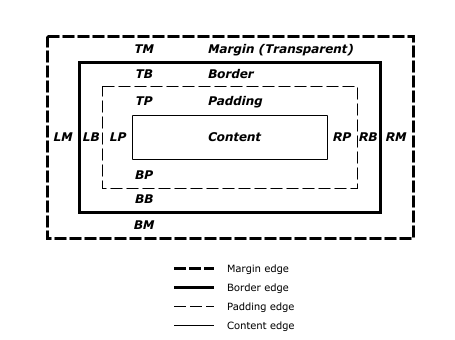
Morover,there are two common ways to make a CSS layout: using position property or float property.
Using Position Property
- Static - the default
- Absolute - relative to parent's hierarchy (usually for header and footer)
- Relative - relative to itself or for small adjustments.
- Fixed - it does not scroll
Using Float Property
- The concept is similar to aligning an image.
- It can be used to create layouts or simply float content.
Tuesday, March 30, 2010
XHTML & CSS (Week 5)
Today, I learned more about the css tags. A css tag contains three items: selectors, properties, and values. for example:
h1
{
     font-size: 24px;
}

h1 = selector.
font-size = property.
24 px = value.

I also learned about the 'Pseudo' selectors such as:
:hover ----> mouse over.

These are some codes from the tutorial:
.entry:hover h2
{
font-size: 30px;
}

.entry:hover p, .entry:hover img
{
 display: block;
}

.entry p, .entry img
{
 display:none;

}
References:
W3schools. 2010, CSS References, viewed 16 March 2010, <http://www.w3schools.com/css/css_reference.asp>.
Subscribe to:
Posts (Atom)